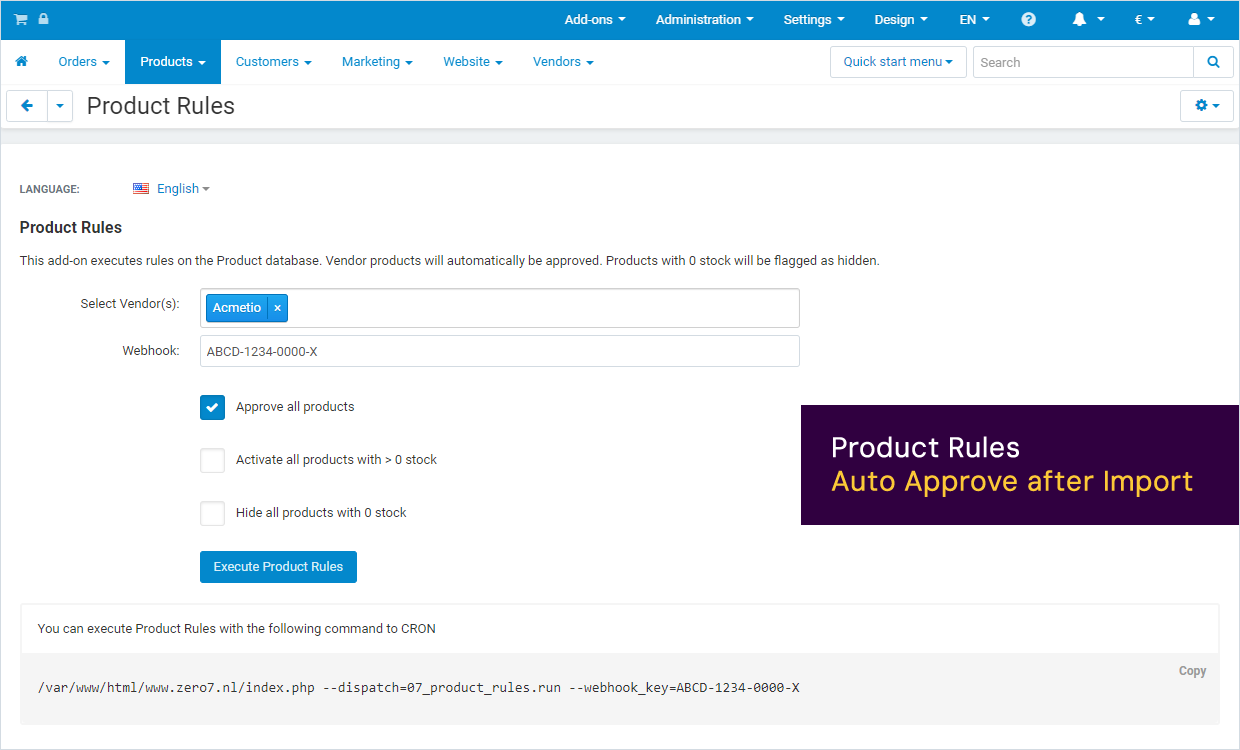
CS-Cart: Product Rules - Auto Approve
Approve, activate & hide products for Vendor(s) with a single click. Let this add-on run automatically right after a product-import and the Product Rules will automatically approve new products, activate products with stock and hide products with no stock, for the selected Vendors.
Automate Product Approval
- Approves all products for selected Vendor(s)
- Activates all products with stock
- Hides all products with no stock
Get it on the CS-Cart Marketplace.
https://marketplace.cs-cart.com/product-rules-auto-approve.html
Options
- Vendor(s)
Select the Vendors these rules shoul apply to.
- Webhook
Submit a unique key for identification. Use this key for manual or CRON activation.
- Auto Approve
Approve all products for selected Vendor(s)
- Activate
Activate all products with stock for selected Vendor(s). Set status to: Active
- Hide
Hide all products without stock for selected Vendor(s). Set status to: Hidden.
Installation Instructions
- Installing the add-on
Follow the CS-Cart instructions to install this add-on to your CS-Cart environment. Installation is simple and easy.
- Configuring the Add-on
Navigate to your CS-Cart adminstration, click 'Products' and select 'Product Rules' from the dropdown.
A. Select the Vendors this Product Rules apply for.
B. Submit a unique Webhook Key.
C. Specify if products should be auto-approved.
D. Specify if products with stock should be activated.
E. Specify if products without stock should be hidden.
- Execute Product Rules
You can run these Product Rules manually by click 'Execute Product Rules' in the Product Rules configuration page. Add a CRON job to your server to execute these rules periodically.
Manual Execution
Execute the Product Rules manually by clicking the 'Execute Product Rules' button. This will open a new window with a URL similar to the below example.
https://<your-domain>/index.php?dispatch=07_product_rules.run&webhook_key=<your-webhook-key>
CRON job
You can execute Product Rules with the following command to CRON. Where <your-domain> is the webaddress of your website and <your-webhook-key> is the key that you submit in the Product Rules configuration page.
/var/www/html/<your-domain>/index.php --dispatch=07_product_rules.run --webhook_key=<your-webhook-key>
Screenshots